
The Common Mistakes When Timing Contractions (And How to Avoid Them)
September 1, 2026

Timing contractions should feel simple — but in the intensity of early labor, it’s surprisingly easy to get it wrong.
Most parents think it’s just “start the timer, stop the timer,” but once contractions get closer together, mistakes pile up fast.
And those mistakes can lead to stress, confusion, or leaving for the hospital way too early (or too late).
Below are the most common mistakes parents make when timing contractions, why they happen, and — most importantly — how to avoid them.
1. Forgetting to Start or Stop the Timer

This is the most universal issue.
During a contraction, you’re focused on breathing and staying calm — not on pressing a tiny button.
As things intensify, it’s easy to:
- miss the start
- double-tap by accident
- stop too late
- forget entirely
- confuse one contraction for another
Even partners get this wrong under stress.
How to avoid it:
Use a timer with one large button and clear feedback.
Apps like Nerd Contraction Timer are designed so you can tap without thinking, even during pain.
2. Mixing Up Duration and Spacing
It’s more confusing than it sounds.
Parents often track:
- how long a contraction lasts (duration)
- how far apart they are (spacing)
But then they accidentally switch them in their head.
Example mix-up:
“Was that 55 seconds long… or 5 minutes apart?”
In manual notes, everything blends together quickly.
How to avoid it:
Choose a timer that automatically calculates both and presents them visually — not as walls of numbers.
A timeline or heatmap removes the confusion completely.
3. Trying to Follow the 5-1-1 Rule… Without Good Data
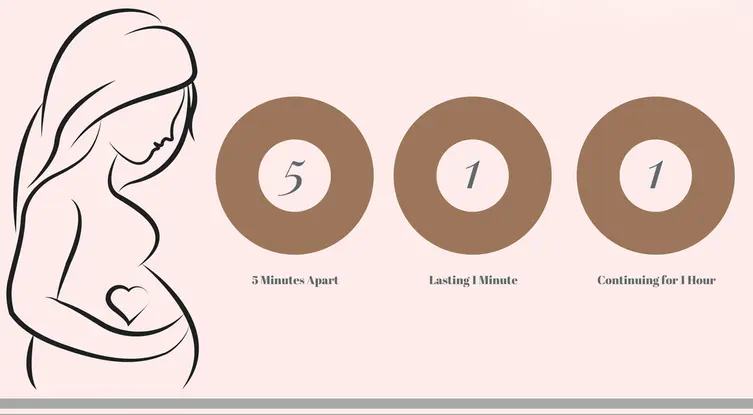
The 5-1-1 rule sounds simple:
- Every 5 minutes
- Lasting 1 minute
- For 1 hour
But when tracking manually, people often:
- forget the older entries
- skip contractions
- misread intervals
- miscalculate duration
- apply the rule inconsistently
This leads to a classic question:
“Are we actually in active labor… or not yet?”
How to avoid it:
Use a contraction timer that visually highlights patterns, so you see when the 5-1-1 rule forms instead of doing mental math.
4. Logging Only the “Big” Contractions

A lot of parents start tracking late — when contractions are already strong.
But early, mild contractions still matter because they show the progression.
Skipping early ones makes the data look:
- inconsistent
- ambiguous
- harder to interpret
It also delays spotting the active-labor pattern.
How to avoid it:
Start tracking as soon as contractions are regular enough to notice, even if mild.
Every block of data helps build the pattern.
5. Switching Apps Mid-Labor

This happens more often than you’d think:
- an app shows an ad at the worst possible moment
- the timer is confusing
- the design feels overwhelming
- the partner hates the interface
- or the app loses entries
So parents download another app mid-labor.
This resets the pattern and creates inconsistent data.
How to avoid it:
Pick a contraction timer ahead of time and practice with it for a day or two.
Labor is not the moment to test UX.
6. Relying on a Stopwatch or Notes App
Stopwatches and notes feel “simple,” but they fall apart fast:
- no automatic calculations
- no spacing detection
- no pattern recognition
- no visual timeline
- no indication of active labor
Once things progress, you end up with a confusing list of times you can’t interpret — especially during pain.
How to avoid it:
Use a dedicated contraction timer.
It’s purpose-built for exactly this moment, so you don’t have to think.
7. Partners Panicking and Losing the Flow

Even calm partners can get:
- flustered
- disorganized
- confused
- overwhelmed
They’re supporting you emotionally and trying not to mess up the timing.
That combination often leads to mistakes in logging.
How to avoid it:
Choose a timer with:
- a giant tap area
- color-coded blocks
- clear visual patterns
When the interface is intuitive, partners become instantly helpful.
How to avoid it:
Use a contraction timer that highlights the pattern as a whole — not just individual entries.
A visual timeline makes progression unmistakable.
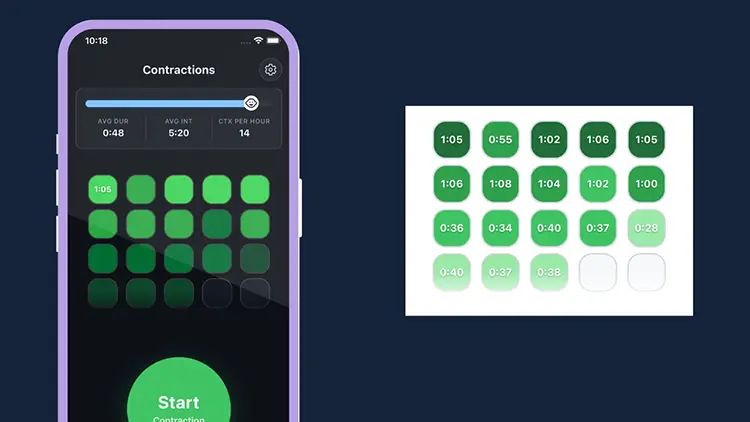
What to Do Instead: Use a Visual, Automatic Contraction Timer
Instead of struggling with math, multiple apps, or half-written notes, use a tool that handles everything automatically:
- one tap to start
- one tap to stop
- automatic duration
- automatic spacing
- clear visual progression
- 5-1-1 rule guidance
- dark mode
- partner-friendly design
- no ads, no subscriptions
That’s why Nerd Contraction Timer exists — to remove every common mistake parents make when timing contractions.
Why Nerd Contraction Timer Helps You Avoid All These Mistakes
✔ Easy one-tap tracking
So you never miss the start or stop again.
✔ Visual timeline instead of number lists
So patterns become obvious instantly.
✔ Automatic 5-1-1 interpretation
So you don’t miscalculate under pressure.
✔ Partner-friendly design
Big buttons, clear cues, no confusion.
✔ Calm UI built for real labor
Minimal, quiet, stress-reducing.
✔ Completely free with zero ads
Because nothing should interrupt a contraction.
Conclusion
Contraction timing sounds simple — until labor starts.
Then mistakes become common, and small errors quickly turn into big confusion.
A good contraction timer removes all of that.
It gives you clarity, confidence, and an instant understanding of how your labor is progressing.
Breathe. Tap. Track. Avoid the mistakes.
Your data — and your calm — will thank you.

👉 Try Nerd Contraction Timer — 100% free, no ads:
https://clemstation.com/nerd-contraction-timer